For business
Every “let me check and come back to you” costs you money.
jhint gives your people the information they need while the conversation is still happening — out of your own runbooks, price lists and contracts.
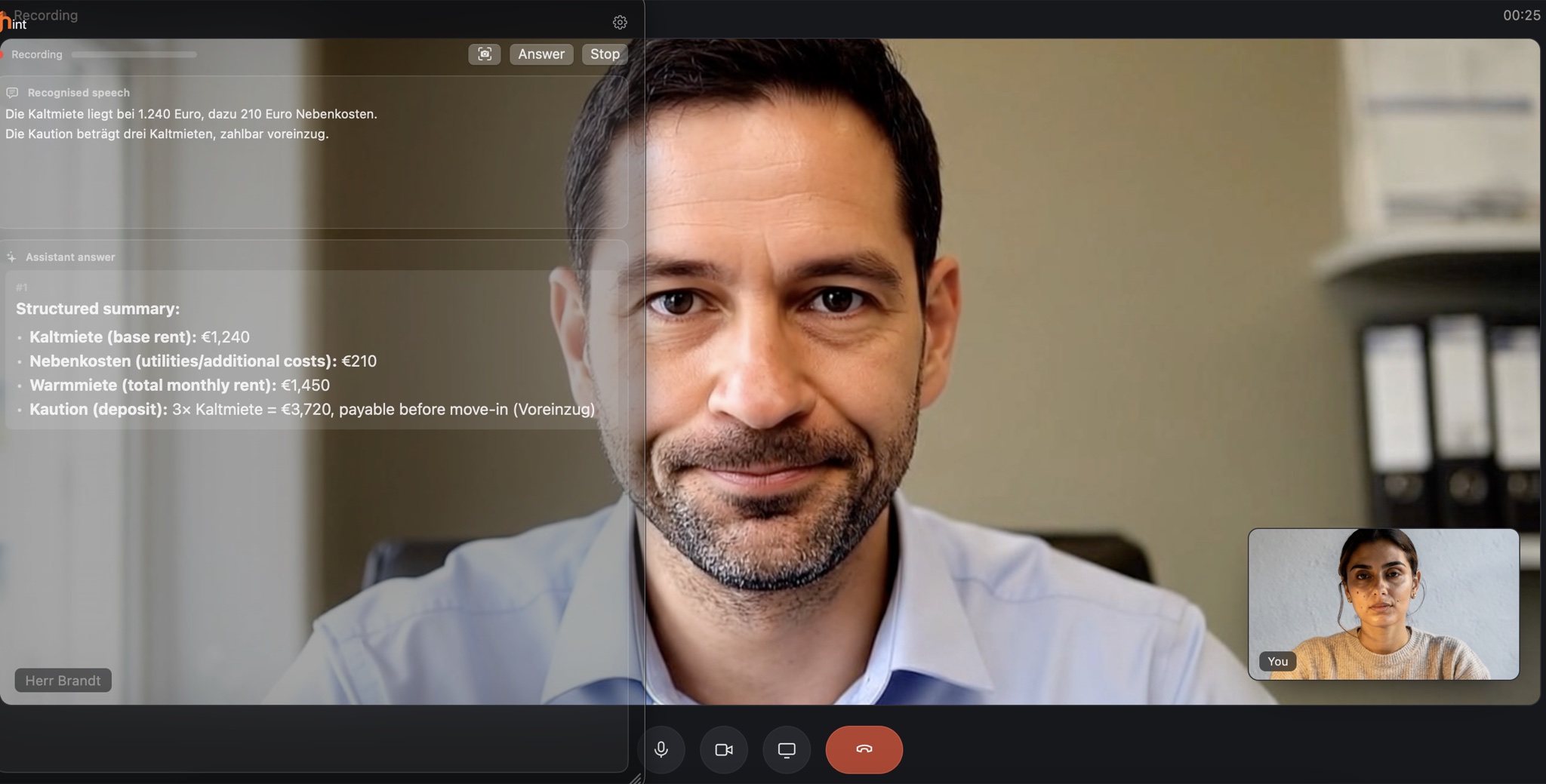
The problem
The answer already exists. Your employee just can't find it fast enough.
It is in the documentation, the price list, the contract, the specification, the notes from the last review. Your company knows the answer — reaching it in the minute that decides the call is the hard part.
- Runbooks and known-issue lists
- Price lists and commercial terms
- Contracts, order forms and statements of work
- Specifications and acceptance criteria
How it works
Your employee talks. Everything else happens on their machine.
The material you already keep, read at the speed of the conversation.
01
It hears the conversation
Speech is transcribed as people speak, on the employee's own computer. The question comes from what the customer actually said, not from a summary typed one-handed.
02
It reads your material
Runbooks, price lists, contracts, specifications — attached to the session from the folder your team already keeps them in.
03
It answers inside the call
One press, one answer, on top of whatever call software is already running — in the seconds while the customer is still talking.
04
It runs where you choose
The model that ships with the app, a provider you already pay for, or a server inside your own network. Same app, your decision, per person.
It sits on top of the call software you already use — it works from the audio your computer plays.
Works with popular communication platforms
-

- Microsoft Teams
- Google Meet
-
 Webex
Webex -

-

- FaceTime
Product names and logos are trademarks of their respective owners. Their use identifies compatible software only and does not imply affiliation, sponsorship, endorsement, certification, or partnership.
Your own software counts too. An in-house dialler, an industry-specific client, a softphone or a browser tab works the same way as the names above — there is no integration list to be on, and nothing for your vendor to certify.
Where it pays
Four conversations your company has every day.
In each one the answer already exists — in a runbook, a contract, a price list, a spec. It just isn't in front of the person who is talking.
Support on the line
The fix is in the documentation. The engineer is on the phone.
The customer describes symptoms in their own words. Somewhere in 400 pages of runbooks is the exact sequence — and the clock is running while your engineer searches for it.
- Attached
- Runbooks, known-issue list, release notes and the customer's plan attached to the session.
- Gets
- The matching procedure, quoted back with the version it applies to, while the customer is still describing the problem.
Shorter calls, and a queue that moves.
Pays for itself at 12 seconds
saved per contact — at $28 an hour fully loaded and 12 contacts a day
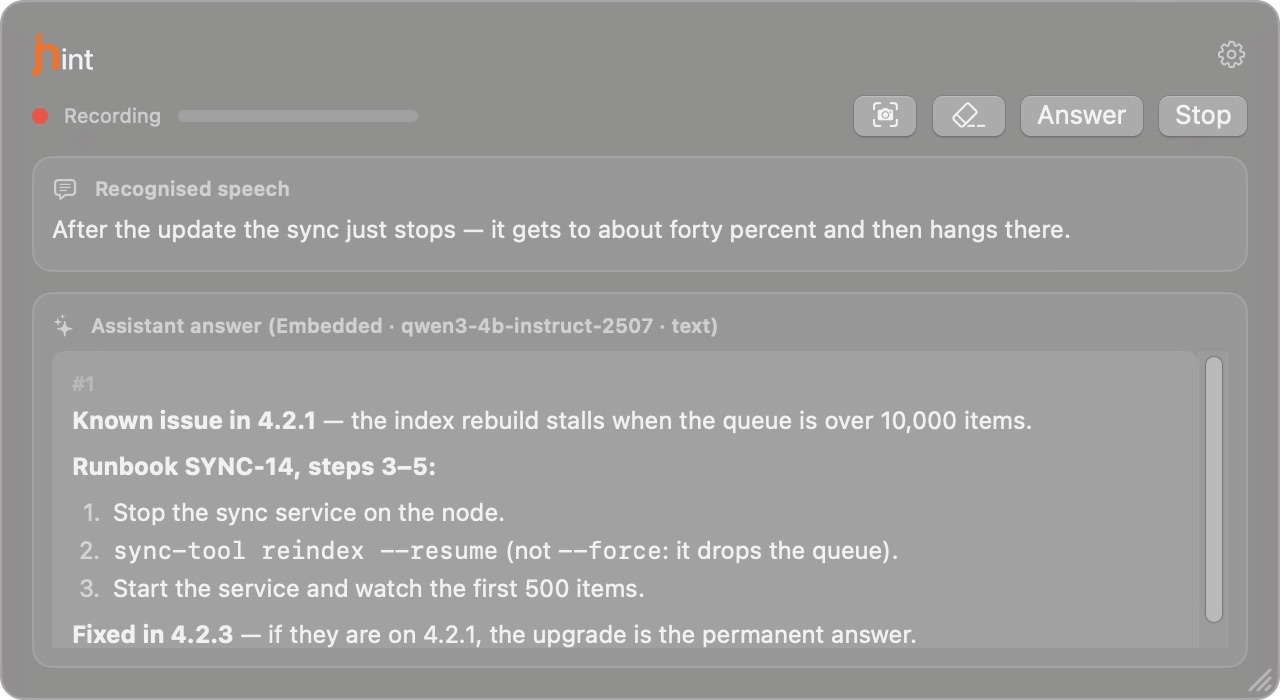
Sales calls
Answer the pricing question in the call, not in tomorrow's email.
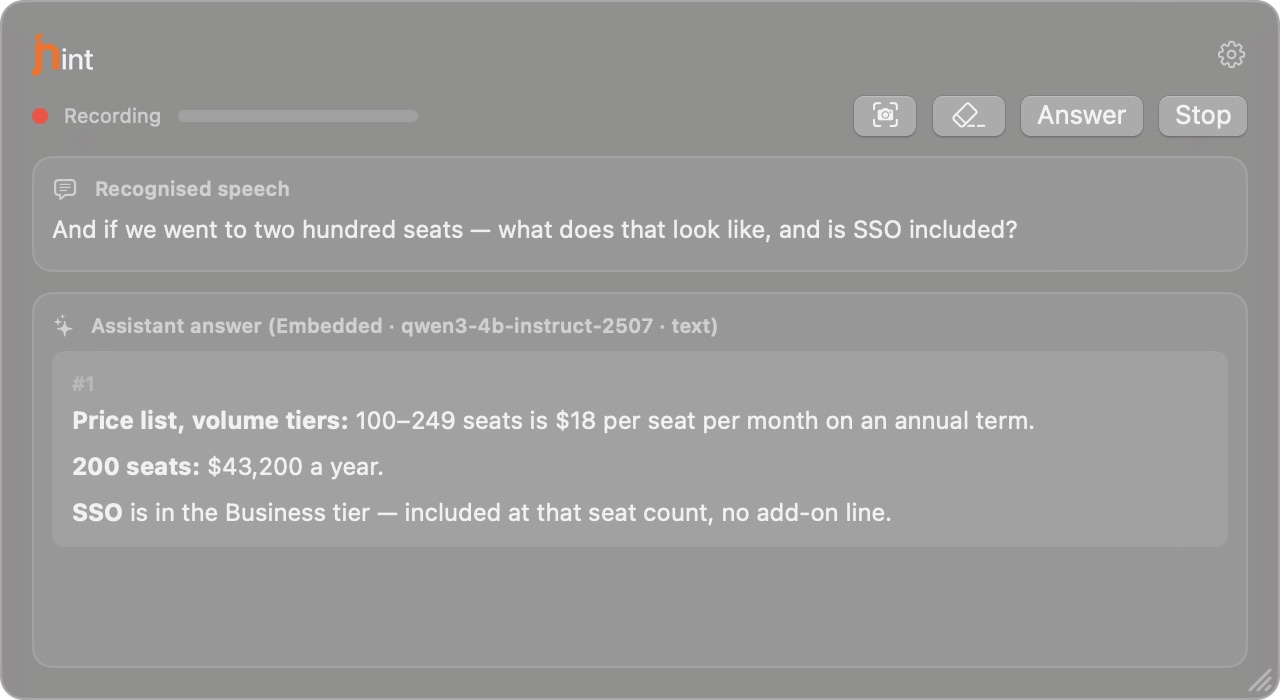
A prospect asks about limits, integrations and what 200 seats would cost. It is all documented. None of it is on the screen, and “I'll get back to you” is where a deal starts to cool.
- Attached
- Price list, sales playbook, product documentation and competitive notes.
- Gets
- Your own material, said out loud in the ten seconds you have — and never a fact that isn't in it.
The answer lands in the call, while it still changes the outcome.
Pays for itself at 1 extra deal
a year for every 32 reps, on an $8,000 average deal
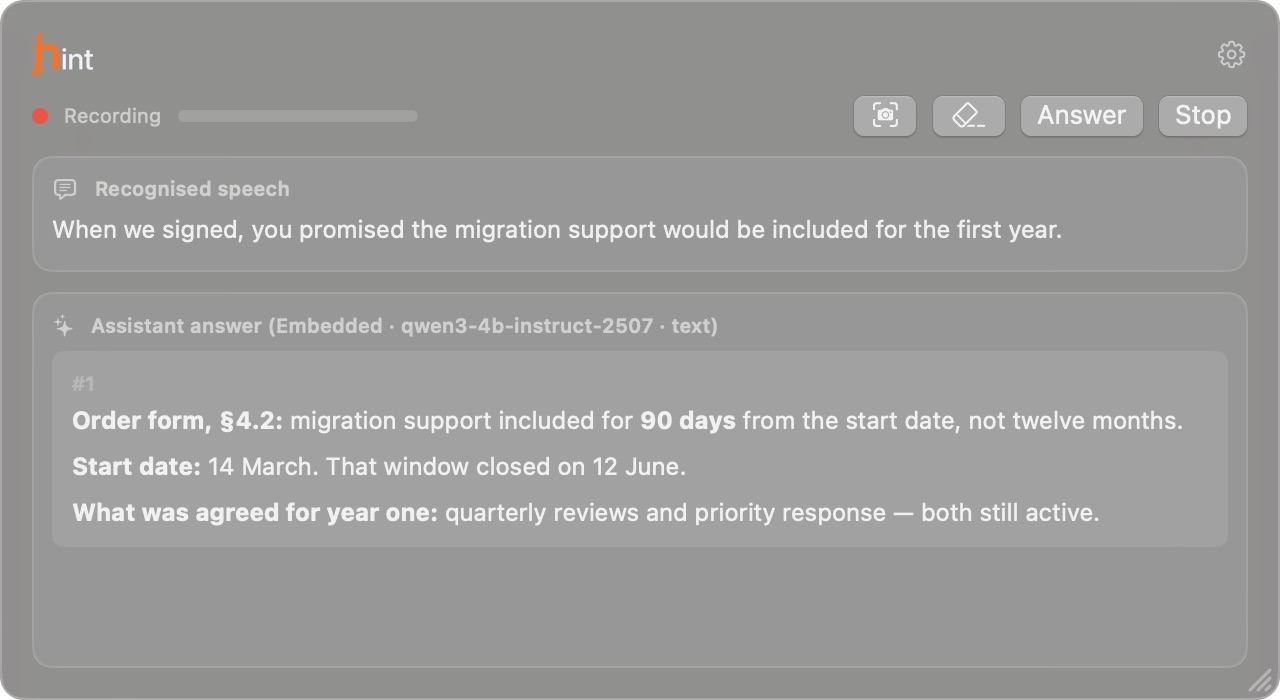
Renewals and account reviews
The commitment you made eight months ago is on page 14.
The customer opens with what was promised at signing. Your account manager either remembers it exactly, or concedes something that was never agreed.
- Attached
- The contract, the order form, the last three QBR decks and the open ticket list.
- Gets
- Each claim matched against the paperwork, with the clause it rests on.
The renewal stays a conversation about value, not about who remembers what.
One avoided concession pays for 20 seats
for a year, at $5,000 of unplanned scope
Vendors and contractors
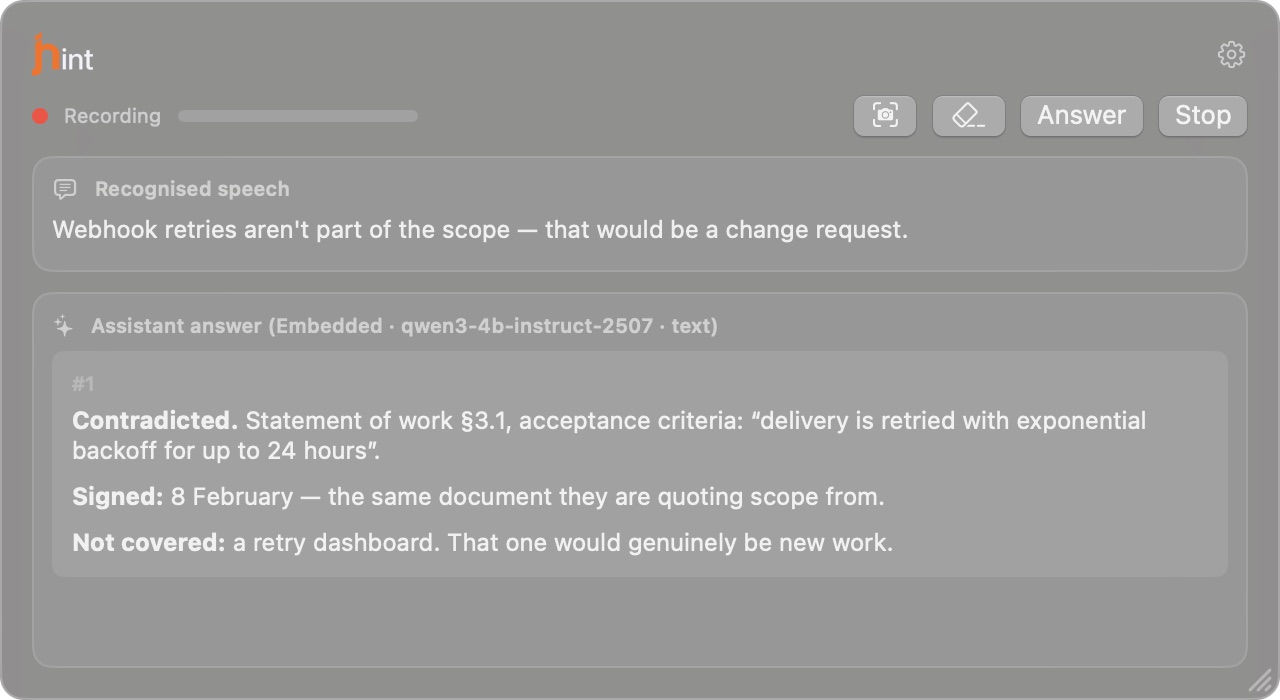
“That's not supported” sounds convincing when the spec isn't open.
Two more weeks, a change request, a limitation that was never mentioned at signing. Every sentence sounds professional, and nobody holds the statement of work in their head mid-call.
- Attached
- Statement of work, contract, API documentation and acceptance criteria.
- Gets
- Claims marked supported, contradicted or unproven — with the clause named, in the call where it still changes the outcome.
The change request gets argued in the call, not on the invoice.
One caught change request pays for 40 seats
for a year, at $10,000 of avoided rework
The obvious question
Your team already has an AI chat window. Why this?
A chat window sits outside the conversation. Someone has to notice the question, retype it, paste the context and read the reply — in the ninety seconds while the customer waits.
It is already in the conversation
The transcript is there before anyone asks, so the answer starts from the customer's actual words.
It answers from your documents
Your runbooks, price list and contracts — attached to the session, so the answer is your material rather than a plausible-sounding paragraph from the open internet.
It is one press, in place
The answer arrives on top of the call that is already running. A second app to switch into is a workflow people abandon by week two.
You decide where it thinks
Any provider you already pay for, the model that ships with the app, or your own endpoint inside the network — and that choice can change without changing tools.
Your numbers
Put in your own figures.
We do not know your business. Type what you know, and the arithmetic is on the page — every formula written out, nothing hidden.
- Hours a year your team stops spending on the search
- —
- What those hours cost you today
- —
- What jhint costs for the same people
- —
- Difference
- —
- Return on the subscription
- —
—
people × contacts × days × minutes ÷ 60 × cost per hour
- Selling hours a year handed back to the team
- —
- Which is this many extra selling days across the team
- —
- Revenue, if each person closes the extra deals you entered
- —
- What jhint costs for the same people
- —
- Difference
- —
- Return on the subscription
- —
—
hours = people × opportunities × 12 × follow-ups × call length ÷ 60 · revenue = people × extra deals × deal size
These are your numbers and our arithmetic — not a result we measured at a customer. Two fields are guesses by definition: minutes saved per contact and extra deals per person. We default them low on purpose; put in what you actually believe. jhint Pro, per person per year: $250.
Privacy & security
Your conversations don't have to leave your environment.
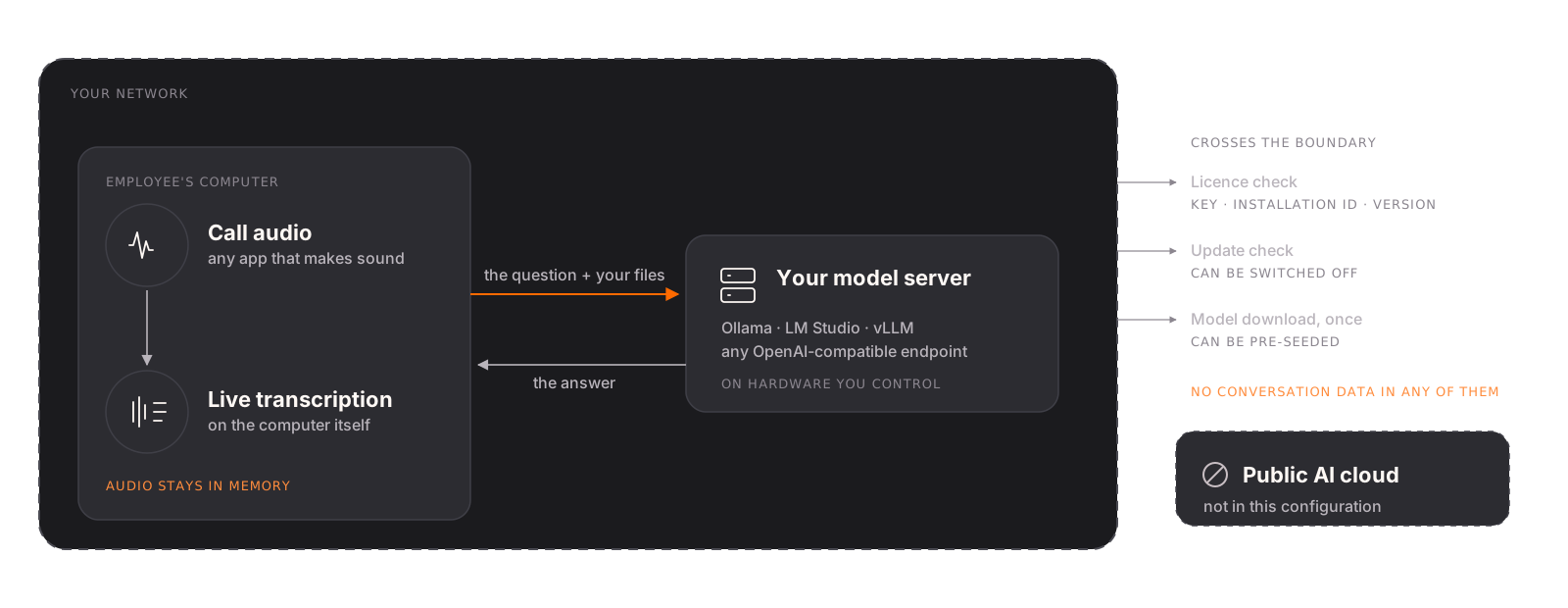
Speech is recognised on the employee's own computer, and the model that answers can be a server you own. Then the conversation stays where it started.
Speech stays on the machine
Recognition runs locally while the call plays, and the audio stays in memory — the same in every configuration, whichever model answers.
Your endpoint, your network
Ollama, LM Studio, vLLM or anything that speaks the OpenAI-compatible API — on a workstation, a server in your DC, or your own VPC. The question goes there and nowhere else.
It sits on top of the call you already run
It works from the audio your computer plays, so your call platform stays exactly as your IT set it up — Zoom, Teams, Meet, a softphone or an in-house dialler.
Three things cross the boundary
A licence check (key, installation id, app version), an update check, and the one-time download of the models. None of them carries a word of the conversation, and in a locked-down deployment the last two can be switched off and pre-seeded.
Answers your security review will ask for +
- Where is audio stored?
- It is processed as it plays and stays in memory — never written to disk, never transmitted.
- Where are transcripts stored?
- Kept only if the person switches it on. Then: on their own computer, encrypted with a 256-bit key stored in protected credential storage provided by their operating system — Apple Keychain on macOS, Windows Credential Manager on Windows — for a retention period they choose. Ours never see them.
- Do you train on our data?
- Training would require a model of ours. The answering model is the one running on the employee's computer or the one you point us at.
- Who are the sub-processors?
- For the product itself, whoever you choose as the model provider — yourself, if you host it. On our side: Cloudflare for the licence service and Paddle for payment and invoicing.
- What personal data do you hold?
- The billing email and the licence key, for the licence to work. Conversation content, transcripts, audio and in-session analytics stay with you.
- Encryption?
- TLS for everything that leaves the machine. Stored transcripts are encrypted at rest with AES-GCM under a per-machine key stored in protected credential storage provided by the operating system — Apple Keychain on macOS, Windows Credential Manager on Windows.
- Data residency?
- Your conversation data stays where your own hardware is. The licence check is served by Cloudflare's network.
- DPA, security questionnaire, own terms?
- Send them. We answer them ourselves, and we are small enough that a person reads what you send.
With an external provider — Anthropic, OpenAI, Google, Groq, OpenRouter — the question goes to that company under their terms, and jhint shows exactly what is sent before the first request. That is a choice you make per person.
What leaves your computer Privacy Policy Provider Disclosure
Built for people
The person in the call owns the session.
This is the part your own team asks about first, and it is why they keep it running instead of quietly closing it in week two.
- They start it and they stop it
- A session opens when the employee opens it and ends when they end it. The window is an ordinary window on their screen — it shows up in screen sharing like any other, and one keystroke puts it away.
- The session stays on their machine
- Everything a session holds — the transcript, the attached material, the answers — lives on the employee's own computer and is theirs to delete.
- Transcripts are theirs to keep
- Kept only if the person switches them on, and then encrypted with a key stored in protected credential storage provided by their operating system, for a retention period they choose.
- The licence is for helping the person talking
- That is what jhint is sold and licensed for: the employee in the conversation, answering from your material.
Working with us
A pilot we run with you.
Four stages. Each one ends with something you can look at, and after the fourth you know whether it works for your team — on your calls, with your material.
-
01
We go through your calls
- Which conversations decide something
- What people are asked, and where the answer lives
- Your terminology, product names and document set
You get: The scenarios worth automating and the material each one needs.
-
02
We set it up your way
- The model: on the machine, on your server, or a provider you already pay for
- Speech recognition: on each machine, or one server for the whole team
- Security: what may leave the network and what may not
You get: A working configuration your security people have seen.
-
03
A small group works with it
- Real customer calls, not a demo script
- We correct the wording and the material as they go
- The people whose calls decide something
You get: Your own people's verdict, from live conversations.
-
04
We report what changed
- Where it answered, and where it fell short
- What it cost to run at that scale
- What a rollout to the rest of the team involves
You get: The numbers to decide on, and a price for the rollout.
Built for your setup, when the box isn't enough
One speech-recognition server for the team
Recognition on hardware you own instead of on every laptop — the same result on machines that aren't the newest in the office.
Your material loaded automatically
Sessions that already hold the right runbooks, price list and contract, taken from your file share instead of picked by hand each time.
Your terminology, spelled your way
Product names, part numbers and internal shorthand written correctly in the transcript and in the answer, from a glossary we build with you.
A model inside your network
Ollama, LM Studio, vLLM or your own VPC endpoint — set up, measured on your hardware, and handed over working.
What it costs
The pilot is priced on its scale — how many people, and how much we build for you. Licence discounts are agreed with each customer and depend on how many people and how long a term. Invoicing, purchase orders and annual terms are all normal here: Paddle is the merchant of record, so the invoice comes from a company your finance team can process without a new vendor onboarding.
A person reads every message and answers from sales@jhint.ai. Send your data processing agreement, your security questionnaire or terms of your own — we answer them ourselves.
Questions buyers ask first
Does the other side know? +
jhint is a window on your employee's screen, and it appears in screen sharing like any other window. What the law requires you to disclose about listening to or keeping a record of a conversation is your call to make, and it differs by country. Audio stays in memory, and transcripts are kept only when the person switches them on.
Can we keep everything inside our network? +
Yes, for everything about the conversation. Speech recognition runs on the employee's own computer; point the app at a model you host and the question goes only there. What still leaves is a licence check, an update check and the one-time model download — none of which carry conversation content, and the last two can be switched off in a locked-down deployment.
Do we need an OpenAI or Anthropic account? +
Only if you want one. Use the provider you already pay for — you bring your own key and the relationship stays between you and them. Use the model that ships with the app and runs on the machine itself. Or point Pro at any OpenAI-compatible endpoint, including one inside your own network — that last option is the most secure of the three. Nobody has to pick the same one.
What does it run on? +
macOS 14 or newer on Apple silicon, or Windows 11 22H2 or newer on a 64-bit machine. The built-in model wants about 4 GB of free memory, and on Windows a discrete graphics card — without one it is not offered, and your own endpoint answers instead. With your own endpoint the machine barely matters.
How do we buy it for a team? +
Through the conversation above: we scope the pilot, agree the licence price for your size and term, and invoice you. Purchase orders and annual terms are normal here, and each licence covers that person's second computer.
Where do the numbers on this page come from? +
From arithmetic, not from a case study. We state every assumption next to the figure it produces, and the calculator uses whatever you type. We have no measured customer results to quote, and we would rather say so than invent one.
Tell us what your team talks about all day.
A person reads every message and answers from sales@jhint.ai. If a pilot on a couple of machines is the fastest way to find out, say so — that works too.